flare-on 13: FLAreCAPTCHA
A fake reCAPTCHA that only accepts a held right-click, and builds the flag out of what looks like layout math.
Me: 6:27, 2.11M tokens, $0.63, stepped in twice.
Truix: 16:51, 1.65M tokens, $1.15, stepped in 8 times.
The first thing I had to reverse engineer was which Edge tab Sol, the model I ran, wanted me to log into.
At 23:02:44 ET, I asked:
do you need me to login to that edge tab?
It opened a visible login page. At 23:03:25:
done
That was all my steering for this challenge. Once it could download the file, Sol handled the HTML and the mouse interaction itself.
Five letters
The FLARE-On description repeatedly calls flare a "five digit password." I count five letters. That's the archive password, not the flag.
1-flarecaptcha.7z contains one file, flarecaptcha.html.
Original file hashes
| File | SHA-256 |
|---|---|
1-flarecaptcha.7z |
853b7e17fb892d3874301247129d085d72cc72af7c7532b38c4cbb77cf62306c |
flarecaptcha.html |
064aa651500a8cb64bb6a2bb3e306c4ea838a331ccfc8384fa56239d4c7d2c45 |
Sol managed to waste some time extracting 4 KB. 7z wasn't on PATH, the archive reader couldn't extract 7zAES, and trying to install py7zr hit a DNS failure. 7-Zip was already installed; using its full path worked:
shell codewrap
"C:\Program Files\7-Zip\7z.exe" x -y -pflare 1-flarecaptcha.7zThe checkbox wants you to fail
Open the extracted HTML in Edge. It presents the usual unchecked square, "I'm not a robot" label, and a reCAPTCHA-shaped logo. I was happy to find all the behavior in the JavaScript. No image-selection puzzle.

It looks clickable enough.
An ordinary left click starts a spinner. About a second later, the widget displays its red failure indicator and:
text codewrap
Robot, or unskilled reverse engineer detected.After another second, it resets. The captured error banner had the class status-banner error show.
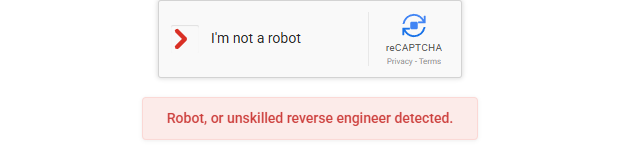
One click and it's already insulting you.
Sol started by reading the HTML rather than clicking through guesses. Search the file for rc-interactive-area, then addEventListener('mousedown'.
In Chromium DevTools, open Sources, press Ctrl+P, choose flarecaptcha.html, then Ctrl+G and enter 374. Or print the relevant lines from PowerShell without changing the file:
powershell codewrap
$source = Get-Content -LiteralPath 'flarecaptcha.html'
373..458 | ForEach-Object { '{0,3}: {1}' -f ($_ + 1), $source[$_] }
The array indexing is zero-based, so index 373 prints source line 374.
The handler starts like this, at flarecaptcha.html:374-385:
javascript codewrap
interactiveArea.addEventListener('mousedown', (e) => {
    if (isVerified || isFailed || isVerifying) return;

    // Ensure click occured in captcha box with 5,0 and 1,1 layout grids
    if (e.button === (Math.pow(5, 0) + Math.pow(1, 1))) {
        isVerifying = true;
        errorLogStartTime = Date.now();
        checkbox.className = 'rc-anchor-checkbox verifying';
        checkbox.innerHTML = '<div class="rc-spinner"></div>';

        // Requirement: Only detect as human if left click occurred more than X time after page load
        rightClickHoldTimer = setTimeout(() => {
MouseEvent.button tells you which button generated the event:
| Value | Button |
|---|---|
0 |
Left |
1 |
Middle |
2 |
Right |
The predicate is literally:
text codewrap
Math.pow(5, 0) + Math.pow(1, 1)
            1 + 1
                2
So the success branch requires the right button.
The comment immediately below it lies twice. It says "left click," but the comparison accepts right. It says "after page load," but errorLogStartTime is assigned on mousedown. The measured interval starts when you press the button.
The three state flags at the top prevent a second press from starting another verification while isVerifying is true. Presses are also ignored while the widget is displaying a failure or has already verified.
The left-button branch at lines 430-441 makes the normal-looking interaction fail on purpose:
javascript codewrap
else if (e.button === 0) {
    isVerifying = true;
    checkbox.className = 'rc-anchor-checkbox verifying';
    checkbox.innerHTML = '<div class="rc-spinner"></div>';

    // Spin briefly (1s) then fail test with red X
    setTimeout(() => {
        if (!isVerified && !isFailed) {
            triggerFailure();
        }
    }, 1000);
}
A more patient left click won't help. It schedules triggerFailure() after 1000 milliseconds.
Hold it, and leave the pointer alone
The right-button callback finishes at line 427 with a 2000 millisecond timeout. I'd be tempted to click and wait, but releasing immediately cancels it.
This is the complete cancellation code at flarecaptcha.html:444-459:
javascript codewrap
// Cancel holding right-click if released or exited early
const cancelHold = () => {
    if (rightClickHoldTimer && isVerifying && !isVerified && !isFailed) {
        triggerFailure();
    }
};

window.addEventListener('mouseup', (e) => {
    if (e.button === 2) {
        cancelHold();
    }
});

interactiveArea.addEventListener('mouseleave', () => {
    cancelHold();
});
Releasing the right button before verification calls cancelHold(). Moving outside #rc-interactive-area does the same thing, even if the button remains pressed.
The failure routine at lines 336-359 cancels the pending success timer, changes the widget state, and schedules the reset:
javascript codewrap
const triggerFailure = () => {
    if (isVerified || isFailed) return;

    if (rightClickHoldTimer) {
        clearTimeout(rightClickHoldTimer);
        rightClickHoldTimer = null;
    }

    isFailed = true;
    isVerifying = false;

    checkbox.className = 'rc-anchor-checkbox failed';
    checkbox.innerHTML = `
        <svg class="rc-cross" xmlns="http://www.w3.org/2000/svg" viewBox="0 0 24 24">
            <path class="rc-cross-path" fill="none" stroke="#d93025" stroke-width="3.2" stroke-linecap="round" d="M6 6l12 12M6 18L18 6" />
        </svg>
    `;
    errorBanner.classList.add('show');

    // Stay on screen for exactly 1 second (1000ms) before returning to normal
    resetTimer = setTimeout(() => {
        resetWidget();
    }, 1000);
};
That clearTimeout() removes the pending callback. You can't tap right, wait two seconds, and expect it to save you.
The page also suppresses the normal context menu at lines 321-324:
javascript codewrap
widget.addEventListener('contextmenu', (e) => {
    e.preventDefault();
    e.stopPropagation();
});
You can hold the right button over the checkbox or its label without the browser menu getting in the way. Once the success callback sets isVerified, the cancellation condition becomes false and releasing is safe.
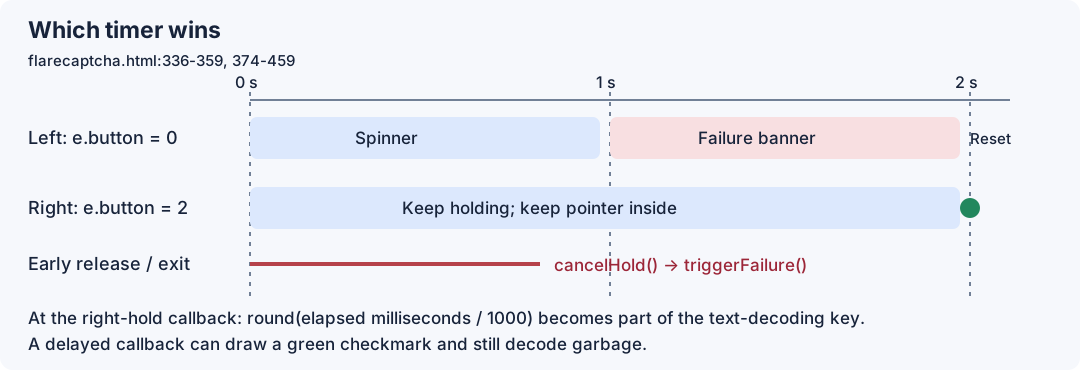
The timer paths in one diagram. Wait for the banner before releasing.
The "layout" calculation decodes the flag
The source has a 30-element array named recaptchaLogoBitmap. Those numbers aren't used to draw the logo. The visible logo is already an SVG in the HTML at lines 284-288.
The array and its wrapper are at lines 361-372:
javascript codewrap
const recaptchaLogoBitmap = [123, 5, 102, 4, 100, 22, 102, 19, 106, 28, 110, 7, 103, 24, 109, 30, 110, 55, 105, 27, 110, 5, 106, 90, 96, 25, 33, 20, 96, 26];

// Setup proxy for logo data to disallow direct string access
const recaptchaLogoBitmapProx = new Proxy(recaptchaLogoBitmap, {
    get(target, prop) {
        if (typeof prop === 'string' && !isNaN(prop)) {
            const envShift = document.characterSet.length;
            return target[prop] ^ envShift;
        }
        return target[prop];
    }
});
The get trap treats numeric property names differently from properties such as "map" and "length". Reading index "0" returns the first table entry XORed with document.characterSet.length. Reading the map method returns the original array method.
Calling .map() through the proxy then performs its indexed reads through that same trap. Every element presented to the mapping callback has already undergone one XOR.
The HTML declares UTF-8 at line 4. With document.characterSet equal to "UTF-8", envShift is 5, the length of that string. For example, the first raw entry is decimal 123, or 0x7B:
text codewrap
0x7B XOR 0x05 = 0x7EThe second entry is 5, which becomes 0x00. Converting those results straight to characters would give you a tilde followed by a NUL. There is another XOR still to apply.
These are the proxy-transformed bytes for the UTF-8 case, calculated from the original array:
text codewrap
7e 00 63 01 61 13 63 16 6f 19 6b 02 62 1d 68
1b 6b 32 6c 1e 6b 00 6f 5f 65 1c 24 11 65 1f
I like being able to prettify source before reading it. This one punishes that habit: the key uses the source length of resetWidget, whose original definition is at lines 327-333:
javascript codewrap
        const resetWidget = () => {
            isVerifying = false;
            isFailed = false;
            checkbox.className = 'rc-anchor-checkbox';
            checkbox.innerHTML = '';
            errorBanner.classList.remove('show');
        };
resetWidget.toString() returns the arrow function's source, starting at () => { and ending at its closing brace. It doesn't include const resetWidget = or the trailing semicolon. The whitespace inside that function contributes to its length.
The right-button timer uses it here, at lines 385-404:
javascript codewrap
rightClickHoldTimer = setTimeout(() => {
    isVerifying = false;
    isVerified = true;

    const errorLogTime = Date.now()

    // Set log granularity to 1 second resolution
    const displayPaddingPx = Math.round((errorLogTime - errorLogStartTime) / 1000);

    const widgetLength = resetWidget.toString().length;

    // Bound the display box to a visually appealing ratio based on the classic Harbour's formula
    const widgetUpperBoundsPx = (displayPaddingPx * (widgetLength + 1115)) & 0xFFFF;

    // set left and right layout limits
    const wupperLeft = (widgetUpperBoundsPx >> 8) & 0xFF;
    const wupperRight = widgetUpperBoundsPx & 0xFF;

    // Generate surface map from logo map and string length
    const displaySurfaceMap = recaptchaLogoBitmapProx.map((b, i) => String.fromCharCode(b ^ (i % 2 === 0 ? wupperLeft : wupperRight))).join('');
The variable names are trying pretty hard to look like widget geometry. Follow their uses:
displayPaddingPxis elapsed time since the right-button press, rounded to whole seconds.widgetLengthis the function's source length.widgetUpperBoundsPxis their derived 16-bit value, masked with0xFFFF.wupperLeftis its high byte.wupperRightis its low byte.displaySurfaceMapis the decoded text.
Even indices use the high byte. Odd indices use the low byte. Each output character therefore comes from:
text codewrap
raw table entry
    XOR document.characterSet.length
    XOR alternating high/low key byte
Counting the original arrow-function text with LF line endings gives 222 characters. 222 + 1115 = 1337. Of course it's 1337. With an elapsed-time value of 2, the arithmetic is:
text codewrap
widgetLength          = 222
widgetLength + 1115   = 1337
displayPaddingPx      = 2
widgetUpperBoundsPx   = (2 * 1337) & 0xFFFF
                      = 2674
                      = 0x0A72

wupperLeft            = 0x0A
wupperRight           = 0x72
The first four characters make the two XOR layers easy to check by hand:
text codewrap
index  raw   proxy XOR 5   alternating XOR   character
0      7b    7e            7e XOR 0a = 74    t
1      05    00            00 XOR 72 = 72    r
2      66    63            63 XOR 0a = 69    i
3      04    01            01 XOR 72 = 73    s
Apply that across all 30 elements and the email appears.
With displayPaddingPx = 3, the key becomes 3 * 1337 = 4011 = 0x0FAB:
| Index | Proxy byte | Alternating XOR | Character |
|---|---|---|---|
| 0 | 7e |
7e XOR 0f = 71 |
q |
| 1 | 00 |
00 XOR ab = ab |
« |
| 2 | 63 |
63 XOR 0f = 6c |
l |
| 3 | 01 |
01 XOR ab = aa |
ª |
That q«lª prefix turned up in the write-up replay below.
At line 413, the page interpolates displaySurfaceMap into the success banner's <span class="flag-code">. Lines 415-424 wire the Copy button to navigator.clipboard.writeText(displaySurfaceMap), and line 426 adds the banner's show class. The callback closes at line 427 with:
javascript codewrap
}, 2000);There is no validation of the decoded string before the green checkmark. isVerified was already set to true at the beginning of the callback.
Sol holds the button
Sol read the HTML at 23:05:09 ET and opened it locally in Edge at 23:05:19 through omp, the agent harness I used. Its browser.open call used headed: false, but attached to the Edge process I'd already used for the login tab. The code below uses omp's browser API, so don't paste it into the page's DevTools console.
At 23:05:24, Sol performed the interaction:
javascript codewrap
const t = browser.tab('captcha-local');

const result = await t.run(async ({page}) => {
    const box = await page.$('#rc-interactive-area');
    const r = await box.boundingBox();

    await page.mouse.move(
        r.x + r.width / 3,
        r.y + r.height / 2
    );

    await page.mouse.down({button: 'right'});
    await new Promise(resolve => setTimeout(resolve, 2300));

    const text = await page.$eval(
        '#success-banner',
        e => e.innerText
    );

    await page.mouse.up({button: 'right'});

    return {text, box: r};
});

display(result);
display(await t.screenshot({silent: true}));
It found the target rectangle instead of assuming a screen coordinate. In that browser window, the rectangle was:
json codewrap
{
  "x": 785.5,
  "y": 425,
  "height": 76,
  "width": 197
}
The automation pressed right, held for approximately 2300 milliseconds, read the success banner while still holding, then released. At 23:05:26, the banner contained the accepted email.
For a manual replay, open the unchanged file in a visible foreground tab. Wait for any previous failure to reset. Put the pointer over the checkbox or "I'm not a robot" label, press the right button, and keep both the button and pointer there until the banner appears. Then release.
The extra 300 milliseconds in Sol's automation was a margin for reading the result. The decoding time is measured when the page's own callback runs, not when the automation eventually releases the button.
The later replay that turned green and printed garbage
I would've called this finished after the accepted solve. When I replayed it for this write-up around 04:30 ET on October 7, the widget turned green and printed garbage. Chromium batches timers in hidden tabs, which can delay the callback enough to change the key. That's why the replay needs a foreground tab.
A 2300 millisecond hold returned without a success banner. An event probe caught the right-button press on rc-anchor-label, but the checkbox was still verifying when it sampled the page.
The replay then increased the hold to 5200 milliseconds. This time the widget reached its verified state, but returned:
json codewrap
{
  "visibility": "hidden",
  "checkbox": "rc-anchor-checkbox verified",
  "flag": "q«lªn¸l½`²d©m¶g°dcµd«`ôj·+ºj´"
}
The q«lª prefix matches the displayPaddingPx = 3 table above. It rounded to three seconds. setTimeout(..., 2000) requests a callback after that delay; it doesn't guarantee the callback executes at exactly two seconds. A delayed callback changes:
javascript codewrap
Math.round((errorLogTime - errorLogStartTime) / 1000)That changes the XOR key. The callback still sets isVerified, draws the checkmark, and shows whatever string it decoded.
Even a headed tab with page.bringToFront() still reported "hidden" despite having focus, and a launch with background-throttling switches failed with net::ERR_ABORTED.
For a reproduction, keep the tab visibly in front and read the entire email. If it is garbled, reload the original and repeat. If you're inspecting the timing in DevTools, break after displayPaddingPx is assigned at line 392, so the debugger pause doesn't inflate the interval before the calculation. Inspect that value, widgetLength, and the two key bytes. Reformatting the HTML or pausing before Date.now() introduces another variable into the same key.
Sol submitted the email from its first run at 23:06:00 ET. At 23:06:03, CTFd showed [*] Correct and the newly available GhostStream challenge.
Triskaidekaphobia is the fear of 13. After this, I'm more worried about a CAPTCHA that lets whitespace and a late timer decide whether I can spell.
The flag: